
Compliance or complaints: they’re closer than they look
A good experience and legal compliance often pull in opposite directions.
Nobody wants to go through the steps of age verification for example, when they just want access to a game or service, and conversely, forcing users to do so can often affect the perception of what would otherwise be a perfectly fine user experience.
Balancing compliance without complaints from users is similar to the challenge facing a high-wire walker such as Philippe Petit, who famously walked between the World Trade Center towers in 1974. I know, it’s an odd comparison, but stay with me!
Maintaining that centre of balance is crucial, because leaning too far either way leads to a similar outcome. On a tightrope, that outcome is obvious. In experience design, you also fail either way: your app won’t be compliant, or your users will be dissatisfied and walk away. In both instances, you’re in trouble.
However, even Petit didn’t balance on his feet alone; he had an important tool to help: his balancing pole helped him walk that line.
As he once wrote of that high-wire feat 52 years ago: “I know it’s impossible. But I know I’ll do it!” I feel a similar optimism about balancing legal compliance and good user experience in today’s digital world.
“Impossible, yes,” he added, “so let’s get to work.” 1
Please note: I’m going to stick to web and gaming technology for this post, as that is my background.
Are you attending to the right problems?
Jakob Nielsen, co-founder of Nielsen Norman Group - a well-known centre of UX knowledge - has a long-running theme behind much of his advice, generally paraphrased as: “Pay attention to what users do, not what they say.” 2
It sounds somewhat lacking in empathy, but it’s a well-known issue with user testing: users don’t tend to know what they want. They simply know what they know.
As product creators, developers and designers, the value lies in focusing on how a product is actually used, not on what users say about it, because they’ll just ask for more of what they know, which might be the wrong thing for your product.
This matters for digital experiences because the cause of user friction is rarely what people first think.
Take the age verification example again: many users might say that the process itself is the problem, but more often it’s the timing and context of what you’re asking them to do.
Where users drop off, how long they hesitate on a step, or when they feel they need to contact someone for help usually points to timing and context over anything else.
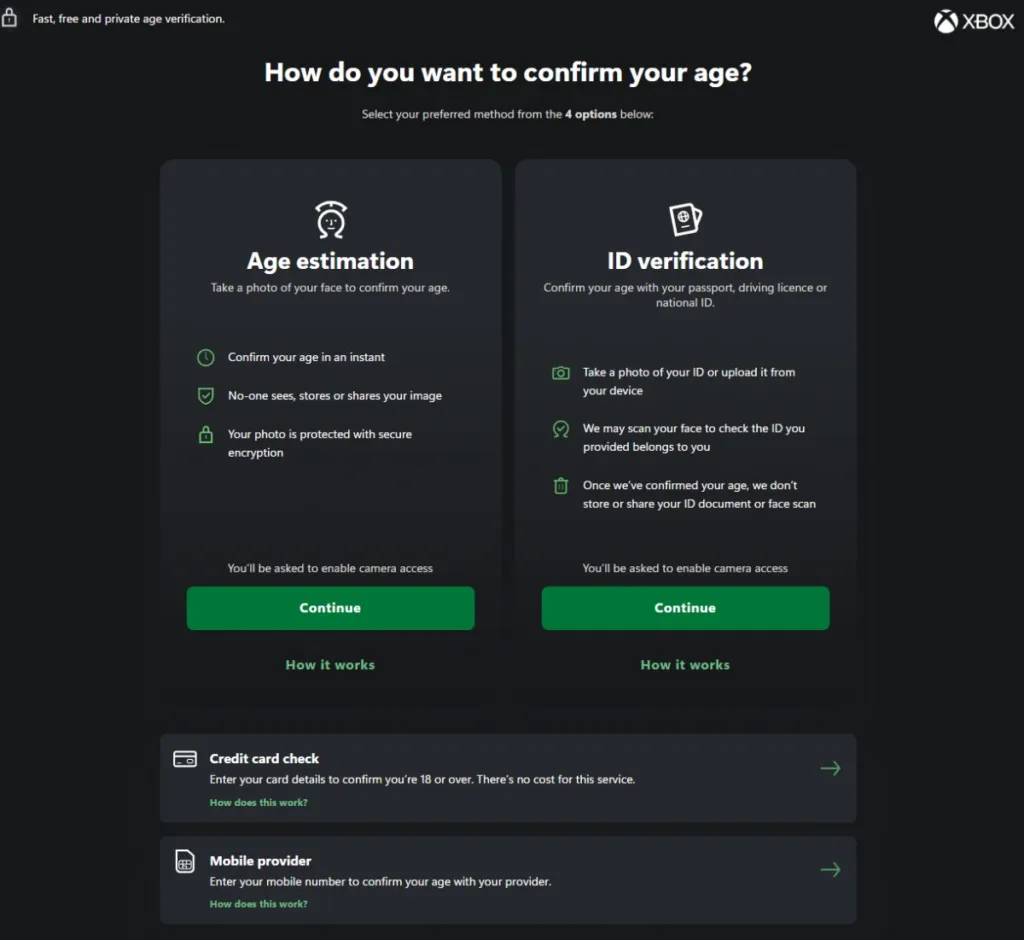
In an interactive web experience like signing up for a service that requires age restrictions (buying alcohol, for example), or an online gaming flow, at what point in the experience does it make the most sense to ask the user to complete age verification?
For the online store example, asking for it up front from all users is likely to cause a huge bounce rate among casual shoppers who want to understand what you offer first. Losing many of them from the upper funnel immediately is likely to affect sales. So moving that flow as close to the point of sale as possible makes more sense, particularly for new users.
Gaming has traditionally done the opposite; you don’t want to be responsible for someone underage immediately gaining access to something they shouldn’t, so the check would usually be tied to a first-time sign-up process, allowing future gaming sessions to proceed unhindered.
Either way, users are already used to the fact that these steps exist and are necessary. What isn’t necessary is being lazy about how and when you implement them.
As I’ll detail some more later in this post, timing is only one of the things you can control, and it’s important to be honest about why designing good user experiences that are also compliant is so difficult.
Why it’s difficult: three buckets and their place in the funnel

One of the most challenging parts of legal compliance is the sheer number of different rule sets businesses need to abide by.
Couple that with regional differences in those rule sets, and it becomes harder still to fully understand what you need to do and how best to approach it.
These rule sets tend to fall into three broad buckets for the majority of cases on the web, although, as ever, there are no doubt exceptions. Those three buckets are detailed in the below table:
| Bucket | Examples | Where the friction occurs |
|---|---|---|
| Privacy | UK GDPR, PECR, COPPA, Children’s Code (Age Appropriate Design Code) | First visit (cookie consent), account creation (data collected) |
| Transactions | PCI DSS, PSD2 / SCA, VAT | Checkout and payment |
| Age and platform | UK Online Safety Act, ESRB / PEGI, TRC / XR / Lotcheck | Sign-up, or the moment a gated feature is reached |
For transactions, if you are the merchant of record, you carry more of the liability for making sure everything is compliant.
It’s not always necessary to have a huge legal team to decipher what is applicable to your business and what isn’t, but it certainly helps! Because each bucket adds friction at a different stage, you have more choice over timing than it first seems.
Designing it to best suit your customers and your business is the real skill.
Designing necessary friction
Age verification, transactions, and when and how you gather user data are all intentional friction. You can’t always choose the rules, but you can often choose how they’re applied.
When assessing how to introduce this ‘friction by design’, I often look to break it down into four core ‘levers’:
- When: place the check at the point of risk.
- How strict: use the lightest form that meets the rule.
- Was it already checked: reuse verification that happened upstream.
- Who owns it: keep the rules current and clearly documented.
Lever 1 - When
As technology advances, it’s more possible than ever to take a hybrid approach to this challenge. Perhaps a guest account has access to highly controlled, age-appropriate content for the casual visitor, while tighter controls for the items or experiences that really need them come further down the engagement funnel.
Roblox is a good example of this. In January 2026, they made facial age estimation or ID verification mandatory worldwide for users who wanted to use features like chat. For users who don’t want to use it? Play stays immediate, and only the risky feature is gated.
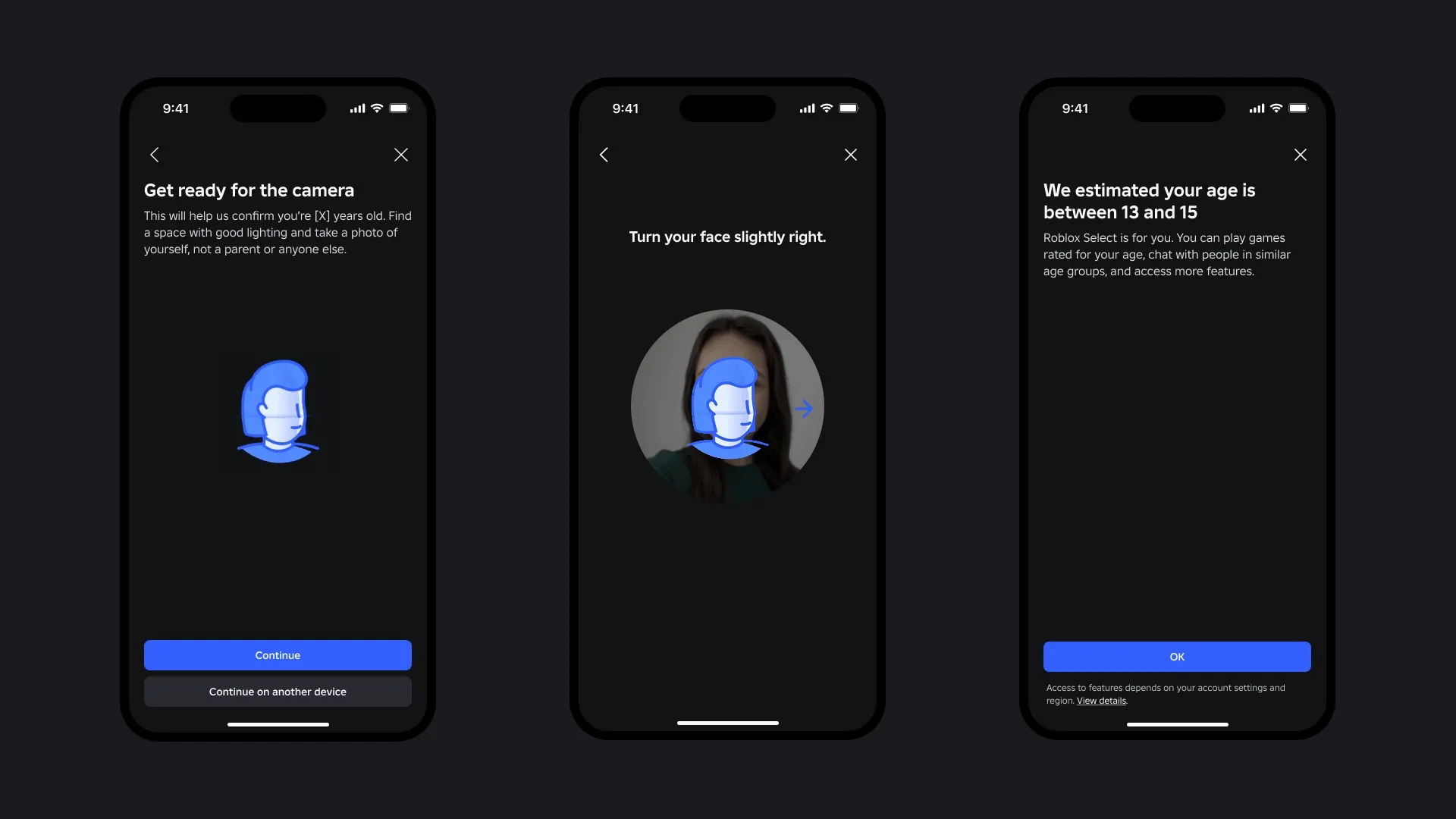
Just over half of daily users in the initial rollout regions completed the check. The rest chose to go without chat rather than complete the flow. A great example of “watch what users do” in action.
Xbox brought in a similar flow in the UK and onboarded players gradually. Driven by the Online Safety Act, it started as optional before becoming mandatory. Players who didn’t complete the check had their social features limited to friends only, while their ability to play and buy games was unaffected, and the check only needs doing once.
Action: consider listing each check in the flow, the risk it protects the business and/or users from, and the earliest point in the flow where that risk genuinely exists. Anything placed earlier than that point is friction you’ve added to the flow, and should be reconsidered.
Once you know the best time to add a check, the next question is how strict that check should be.
Lever 2 - How strict
The lightest method isn’t always the best choice, but it is a good starting point.
Start with it, then check who it shuts out.
In August 2025, Steam introduced age checks in the UK based on whether a credit card was stored on a user’s account. That approach works better in some territories than others. In the UK, many players only have a debit card, so while it was compliant, it locked many of them out of the full breadth of content available.
One thing I’ve got wrong in the past with age gates is assuming the simplest option is the best, but there’s a difference between ‘simple’ and ‘compliant’. When we first added age gates to product websites, we used a basic check:
“Are you over 18? Yes / No”
Does that look familiar? It became a bad pattern across the web when these preventative rules came in. We also used the pattern of locking a birth-year dropdown so users could only select years that made them 13 or older.
Both were terrible implementations. Yes, they were fast for users to complete and easy to implement, but they effectively did nothing and didn’t meet the guidance.
A simple or light implementation is fine, but one that doesn’t meet the rules is just broken.
It wasn’t until we received a warning from a rating board that we learned from those implementations. We then made sure they were both neutral and browser native, so they worked on any device / browser rather than a specific few. This improved accessibility at the same time.

Action: for each check, document the methods the rules accept and note which user groups each method fails. Pick the lightest check with an acceptable failure group, and implement a reliable fallback.
The lightest check is the one the user has already completed elsewhere.
Lever 3 - Was it already checked
Businesses often think they need to build a bespoke check, even though someone else in the chain may have already performed it.
From a payments perspective, this might be a partner that already carries PCI DSS compliance, such as your payment provider or a merchant of record. Or it might mean offering common payment types such as digital wallets (Apple Pay, Google Pay) or PayPal, so you don’t need to request all of that data from users and handle it yourself.

Digital wallets also enable strong customer authentication through a biometric check, with no extra steps. A clear UX win for something that has historically caused a lot of friction.
It could also mean relying on information held by a platform. In the Xbox example from Lever 1, a user who has already verified their age at platform level shouldn’t need to repeat it in-game, and that verification also opens up the social features that were previously restricted.
Action: for each check, validate whether a partner has already performed it, and whether you can use that outcome in your product.
Relying on others still means you’re accountable for the implementation, even if they share some of the risk. That’s where governance is important.
Lever 4 - Who owns it
In my experience, developing the above knowledge in-house and converting it into referenceable governance documentation, written in plain English, has been a worthy investment of time.
Otherwise, you hit that age-old issue of it all being held in the head of Cathy from legal, or of it walking out the door when Pete, the lead PM who has been juggling too many balls for too long, decides to find a new opportunity elsewhere.
Yes, it’s a maintenance overhead, but with AI tooling making summarisation and document creation easier than ever, there’s no excuse not to do it. Just be sure to regularly review its accuracy - as you should with any process or system that needs strict governance.
It can then also become a useful onboarding reference for employees who need to get up to speed quickly.
Take cookie compliance, for example - something I regularly audited for GDPR compliance in the past. The ICO expects a “Reject All” option next to “Accept All” on the top layer of the banner. With that knowledge to hand, your team (or your automated tests) can spot when it’s missing.

Rules can change in the other direction too: since February 2026, certain analytics and functionality cookies have been exempt from the PECR consent requirement, removing a previously required check.
As soon as your documentation goes out of date, you’re likely carrying friction that is no longer necessary or, worse, you’ve become non-compliant.
Action: keep your compliance ‘friction’ documented: the rule behind it, when it’s used, an owner, and a review date. It’ll keep you honest and up to date. More importantly, it’ll help you remember why you added it and whether you still need it.
Like Petit’s balancing pole, it won’t prevent the storm, but it can help you stay steady and consistent when it comes.
Reaching the other side
A product’s vision should help dictate what friction is necessary.
Watching how your product is used and acting on the right signals are your strongest tools for deciding when to introduce it.
You don’t get to choose the rules, but you can control when they’re applied, how strict they are, who checks them (or whether they’ve already been checked), and who owns them.
Get the levers right, and how you present it becomes a craft problem, not a strategic one.
Footnotes
-
Philippe Petit’s book where the quotes can be found source link (opens in new tab). ↩
-
Jakob Nielsen’s article from 2001 source link (opens in new tab) ↩